Microsoft LMS Integration
Connect Office 365 with your Learning Management System
Access to your Outlook calendar, chat, document library and mailbox along with all the multiple features that come with Paradiso LMS
Trusted by 1000s of Companies Globally…











Enhance your eLearning experience with Microsoft LMS Integration
It is very common that companies or institutions count with different applications before they realize that a Learning Management System is the solution to take online training or courses to the next level. When they acquire the LMS, become very difficult to manage and coordinate all the applications. What to do if you already have all the information split in the platforms?
You’re lucky, we have the answer to that. The best and easy way to keep the information and don’t lose it is the integration of the systems. Not all the eLearning companies can do it, but the good news is that Paradiso LMS can be integrated with more than 100 applications. Great, isn’t it?
Microsoft Office 365 counts with many tools that are commonly used for many companies and institutions. The outlook calendar, chat, mailbox, document library, etc. With Microsoft LMS integration you can sync them with the Learning Management System, having all the data, meetings, reminders and docs in the same place, avoiding confusions. Get at your disposal tools that will provide access to email and calendars, Microsoft Office web apps, websites, instant messaging and video conferencing, along with all the LMS features that will help you increase the online training capacities.
The best thing is that the Microsoft LMS Integration is available to run from almost any place and device, allowing you and your employees to access in any place, whenever you prefer.
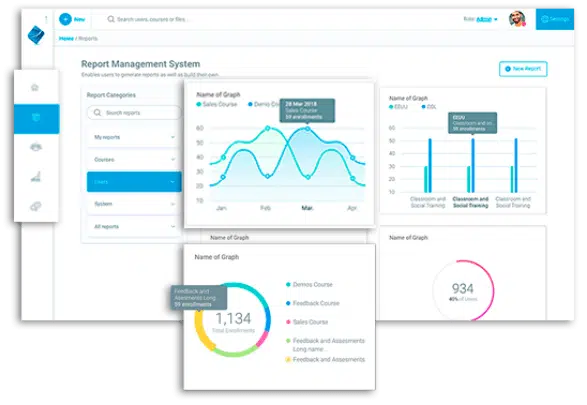
Microsoft LMS services complement a learning platform to provide a more productive experience for teachers and students.
The integration streamlines the following Microsoft applications:
Microsoft Teams
Microsoft Teams LMS integration works the best for collaboration and online training. Learners can access live training and participate in collaboration sessions in real-time through the LMS platform. It enables training in the flow of your daily work. You can create Teams channel per class and give access to only a specific group within the team.
- Teams bring chats, calls, video conferencing tools, and collaboration under one roof.
- Join Microsoft teams meeting and learn on the go.
- Access training with Single Sign-On.
- Create Teams channel per class.
- Share, discover and create courses with Office 365 suite.
- Connect, engage and communicate in the group for assignments and posts.
- Customize using Teams features.
- Engage in group projects and chats.
- Groups and discussion forums help in getting feedback about the training.
- Instructors can use Teams Admin Center to track assignments, monitor progress charts or the growth path of participants.
Microsoft Dynamics CRM
Microsoft Dynamics CRM integration with Paradiso LMS provides training for employees, customers, and partners. The platform is highly customizable to have the look of style as per your brand. In addition, it automatically syncs data, helps in auto-enrollment, and taps into customer data to streamline business management.
- Customize all your data under one roof.
- Measure, track and optimize sales training.
- Access training with Single Sign-On.
- Advanced reports, auto-enrollment, and user data synchronization.
Microsoft Dynamics ERP
Microsoft Dynamics ERP LMS integration improves communication across the company, thus improving operating efficiency. It is a tool for data analysis, automation, processes, collaboration, and workflows to streamline business operations.
- Higher visualization of tasks and workflows.
- Analyze and monitor data that is centralized.
- Access to course analytics like enrollment status, certifications, grades, and course completion.
- It provides automation and improves efficiency.
Microsoft SharePoint
Microsoft SharePoint LMS integration provides a more personalized learning experience to learners. With this integration, you can have a calendar, chat, document library, and mailbox at your fingertips, along with all the features of Paradiso LMS.
- Create, collaborate, organize, manage and share files with SharePoint integration.
- SharePoint broadens capabilities like Intranet portals, document and file management, collaboration, social networks, and workflow automation.
- Embed LMS Blocks into SharePoint Pages.
- Enables high-end content management capabilities with the capability to upload content to SharePoint directly.
- System and process integrations do not require separate transfers of documents to be made.
- SharePoint manages information efficiently to conduct perfect training.
Microsoft OneDrive
Microsoft OneDrive LMS integration helps you create files and sync them with the LMS. The synced files can be shared with specific team members within the team through SharePoint for collaboration. In addition, the backup of all files in the drive gives learners to access the material anytime, from anywhere.
- Attach resources in OneDrive and organize and store course content at a central location.
- Enable collaboration in documents and content folders.
- Sign Sign-On, calendar management, and course content creation with OneDrive.
- Plan all workflow improvements for seamless operation.
- OneDrive helps have a course library with 1000s of courses on topics such as Leadership, Compliance, Soft skills, IT skills and many more.
Microsoft OneNote
Microsoft OneNote LMS integration enables learners to organize, save ideas, and plan important tasks all kept in one place. In addition, notes taken on one device can be synced with the learner’s account across all devices. This makes accessibility possible with ease.
- OneNote Class Notebook offers Learning Tool Interoperability (LTI).
- Create a shared notebook and link it to your course that can be accessed by all learners enrolling for the course.
- Take notes on the go while at work.
Microsoft Outlook
Microsoft Outlook LMS integrations help you have all your emails, files, and calendar in one place. In addition, it enables learners to get notifications about changes made to learner groups, files, calendar, etc. that helps keep track of your tasks.
- Create events using Google calendar and get triggers when the event is due on Outlook.
- Get email notifications for task status and changes to tasks in Microsoft Planner.
- Sync Google calendar and recall emails whenever required.
Microsoft LMS integration key features
Acquiring just Paradiso LMS will bring you useful features that would take your courses or training programs to the next level. It is hard to find in the market an LMS platform that comes with that much features as Paradiso LMS, the best part is that is very intuitive and easy to use. You can find:

- Gamification tools
- Blended learning
- Personalized and robust reports
- Social learning
- Competency management
- Mobile learning, among others
Multiple Advantages from Paradiso LMS
But you won’t only get all the multiple advantages from Paradiso LMS, you would also get some other features designed especially for the Microsoft LMS integration that would complement your eLearning platform even more.
User Sync and User Creation
This feature allows users to log in to the LMS using their Microsoft accounts. Users with existing LMS accounts can switch to using this authentication mode, and new users can log in and have an account created for them. If the administrator allows users, they can also choose to disconnect from Microsoft and revert their previous login method, or username/password.


Hierarchy
If your business has a complicated hierarchy structure, then this can be shared with and replicated in the LMS. This will also let you manage the permissions and accesses that your users will have within the platform.
Repository
With this feature, you will have the capacity to import files into LMS from Microsoft, upload files into Microsoft from within the LMS, link to files in Microsoft so users always get the most up-to-date version or embed documents into the LMS courses so users can view documents directly on the site.


SSO – Single Sign-On
Microsoft LMS integration includes Single Sign-On with Microsoft accounts. This means users only need one ID to log into both platforms. The users get one-click access to the LMS in the cloud from behind the firewall. Gone are the days when you needed to remember two different usernames or passwords for the same.
Embed LMS
Access the LMS directly from Microsoft with embed LMS. No need to switch between platforms. This saves on the time and money to manage and distribute training, as well as other aspects of your daily business.

Why you should think about Microsoft LMS Integration?
One of the main benefits that come with this integration, is the possibility to save time of going and coming from many applications. Is easier if you can actually have all your information, meetings, docs in the same place. Some of the main benefits that you can enjoy are:
- Have all the meetings, appointments and reminders in the same calendar, that way your employees don’t forget classes, exams, homework or important job.
- Get access from the LMS to all the necessary documents located in Office 365.
- Get the notifications and certifications in the mailbox.
- Use Microsoft chat to promote discussions and forums in the Learning Management System.
- Be constantly updated/informed about the upcoming events.

Main Resources

Empower your training initiative
It involves changing people to improve performance, which in turn changes organizations to improve success

Check Out The Company Brochure
We always deliver more than expected for business both large and small

How to choose
the Best LMS
Check out our advice on selection of the ideal LMS for your training company so that your clients have the finest learning experience possible