Simplifying Learning: How an LMS Can Help You Grow, Train, and Succeed
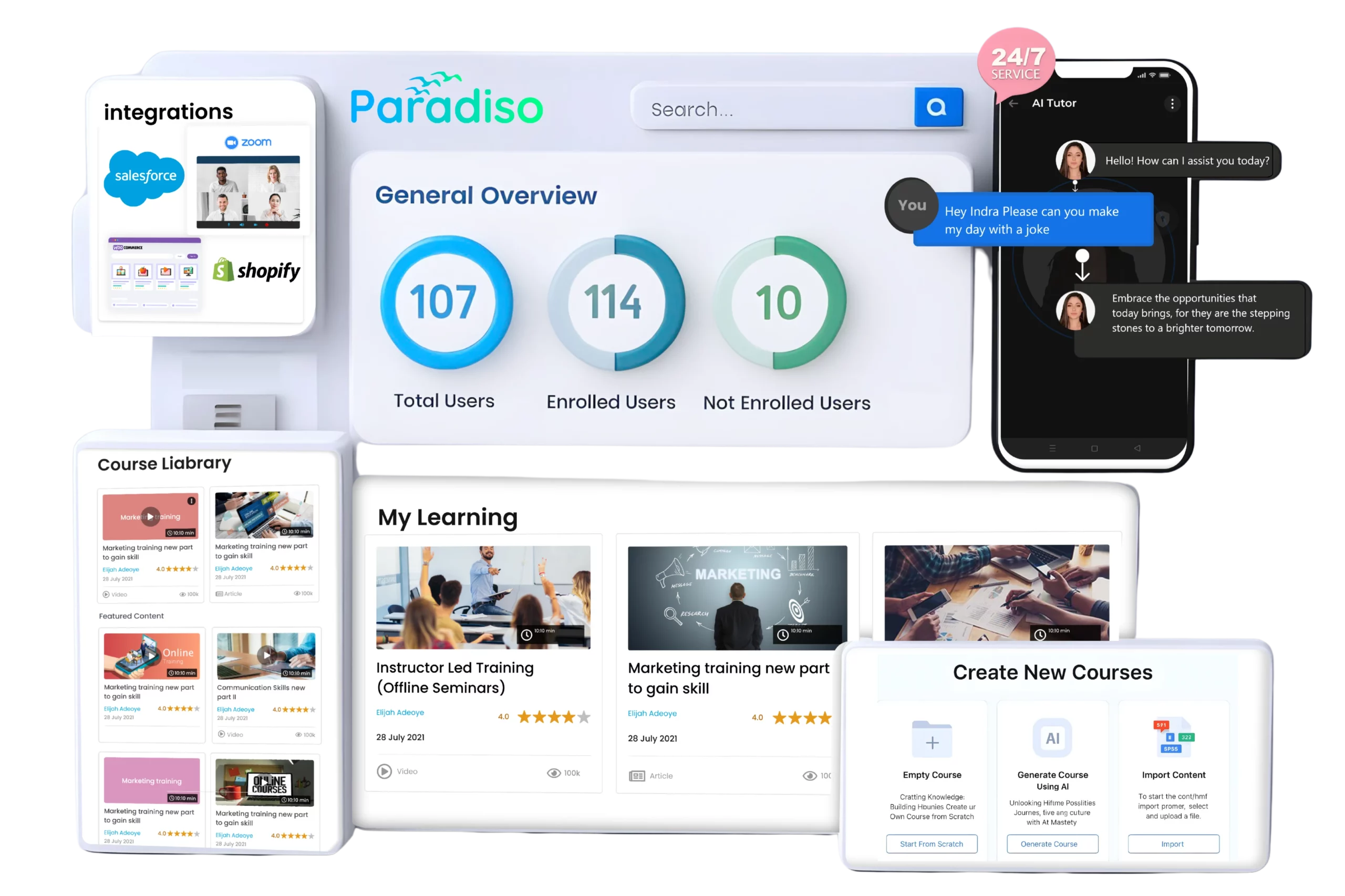
In today’s fast-paced business environment, training and development isn’t optional – it’s a business imperative. If your organization is still relying on outdated training methods – in-person workshops, manual tracking, and paper-based assessments – you’re losing time, money, and employee engagement. Enter the Learning Management System (LMS) – a game-changer for modern training programs.
An LMS centralizes, automates, and streamlines learning, enabling scalable, efficient, and compliant training solutions. But most importantly, it drives measurable outcomes – cost savings, increased productivity, and employee retention. This isn’t just a nice-to-have tool – it’s a strategic investment that directly impacts your organization’s bottom line.
A Learning Management System (LMS) is a software platform that enables organizations to create, deliver, and track training programs online. It’s the central hub where all learning content is stored, users are managed, progress is tracked, and results are measured.
An LMS helps organizations:
Whether you’re looking to onboard new employees, provide compliance training, or upskill your workforce, an LMS brings everything under control, with full transparency and actionable insights.
LMS stands for Learning Management System. It’s a software tool designed to manage and deliver learning experiences, from onboarding and compliance training to skill-building and personal development.
In simple terms, it’s a system for managing learning – enabling you to create, track, and manage training programs with efficiency, scalability, and real-time tracking. And it’s vital in today’s world, where continuous development and compliance are key to staying ahead.
Training without an LMS is a logistical nightmare. Manual processes, paper tracking, and the costs associated with in-person sessions add up fast. With an LMS, you eliminate many of these expenses, such as travel, venue, and instructor fees, and reduce admin overhead. Automated tracking and reporting cut down the time spent on manual paperwork by over 50%.
Real Example: A global healthcare organization reduced training costs by 60% in the first year after implementing Paradiso LMS. (source)
Employees don’t want to sit through outdated, irrelevant training. An LMS offers interactive, engaging content – videos, quizzes, and gamification, that makes learning fun and effective. When employees can engage with personalized learning paths and self-paced courses, they’re more likely to finish training, retain knowledge, and perform better.
Real Example: Companies using an LMS like Paradiso LMS see 30% higher completion rates for training programs compared to traditional methods. (source)
As organizations grow, so do their training needs. An LMS scales effortlessly with your business, accommodating thousands of users across different geographies. Whether you’re training 10 people or 10,000, an LMS ensures every employee receives the same consistent, high-quality learning experience.
With an LMS, data is at your fingertips. Detailed reports show exactly how your employees are performing, which areas they’re struggling in, and where your training programs need improvement. These actionable insights allow you to make informed decisions about your training strategies.
Real Example: A leading global manufacturer used their LMS data to improve employee performance, resulting in a 40% increase in productivity within the first six months. (source)
In regulated industries, compliance is non-negotiable. An LMS automates compliance tracking, ensuring that employees complete mandatory training on time. It stores records of completed training, certifications, and expiration dates, so you’ll always be ready for audits.
Real Example: Paradiso LMS helps businesses in regulated industries, like healthcare, financial services, and manufacturing, reduce the risk of non-compliance and avoid costly penalties by automating certification and tracking.
If you think an LMS is just a digital course library, you’re already behind. LMS technology is evolving fast, and organizations that don’t adapt will lose competitive ground – in training quality, employee retention, compliance, and performance metrics.
Here are the most important LMS trends for 2026 – not buzzwords but shifts you must know if you want training that moves the needle.
AI is no longer a futuristic add‑on – it’s now core to modern LMS platforms.
What this means in practice:
Employees learn on their phones, on breaks, on the go – not only at desktop workstations.
The future of LMS is mobile‑enabled:
Generic training content is a thing of the past. Organizations are moving towards personalized learning experiences where training paths adapt to individual role, skill gaps, performance, and career goals.
This includes:
Gamification isn’t about badges and points anymore – it’s about measurable engagement.
Modern LMS platforms leverage:
Organizations are no longer satisfied with LMS in isolation. The future is connected learning – where the LMS integrates tightly with HR, CRM, talent systems, and business data platforms.
Expect deeper integrations with:
Basic reporting is no longer enough. LMS platforms that excel in 2026 will offer predictive analytics – insights that help organizations act before problems occur.
Capabilities include:
Regulated industries (healthcare, aviation, finance, manufacturing) face real penalties for non‑compliance.
LMS platforms in 2026 must include:
Learning isn’t just about courses anymore. The future includes social knowledge sharing:
A Learning Management System (LMS) is the backbone of any modern training program. It simplifies the entire learning process by centralizing content, managing learners, and automating tasks.
Whether you’re running a small training session or a global educational program, an LMS provides the framework that ensures efficiency, scalability, and accountability in every aspect of learning. Here’s how it works:
At its core, an LMS is built to handle three main functions:
The system stores and organizes all learning materials, from training videos to reading materials, assessments, and quizzes. Users can access these resources based on roles, permissions, or learning paths.
An LMS enables administrators to manage users, assign them roles (e.g., learner, instructor, admin), and control who has access to which content. You can create groups, assign specific training to different teams, and track progress through centralized dashboards.
The LMS tracks learner progress, records completion rates, and generates reports. This includes real-time data on training progress, quiz scores, and certifications. Admins can use this data to identify learning gaps, assess performance, and improve future training.
The system integrates these core components to deliver a seamless learning experience. Learners have easy access to training, while administrators can focus on data analysis and program improvements.
The delivery of learning content within an LMS has evolved significantly with advances in technology. In modern LMS platforms, content can be delivered in various formats, and here’s how it works:
LMS platforms allow instructors or admins to create structured learning paths. These paths can consist of a series of courses, where each course includes a mix of videos, documents, quizzes, and interactive modules. This gives learners a step-by-step approach to mastering a subject.
One of the key advantages of an LMS is on-demand access. Learners can access training content whenever and wherever they want – be it through a desktop, laptop, or mobile device. This allows employees to learn at their own pace, especially in remote or hybrid work environments.
LMS platforms support blended learning, which combines online learning with face-to-face sessions. For example, employees might complete foundational knowledge online, then attend a live webinar or workshop to deepen their understanding. LMS can manage both forms of learning, make scheduling and track easy.
The content in modern LMS platforms isn’t just static. Interactive learning tools such as gamification, simulations, and virtual labs are becoming increasingly popular. These help keep learners engaged and enhance knowledge retention.
Managing the content lifecycle is a breeze with an LMS. Trainers can upload new material, update existing courses, and ensure that learners always have access to the latest content. When compliance requirements change, for example, it’s simple to update relevant training and notify all affected learners.
The LMS automatically tracks learner progress through each course, documenting which content has been accessed, quiz scores, and milestones achieved. This allows learners to see how they’re advancing through their learning journey and gives managers the ability to quickly assess progress.
Analytics dashboards provide managers with up-to-the-minute data on learner activity, including:
These insights allow organizations to pinpoint areas where learners may be struggling and where content needs improvement.
Most modern LMS platforms allow for customizable reporting. Organizations can generate detailed reports based on specific criteria, such as:
Managers can filter reports by learner, department, or course to assess performance across multiple metrics, such as engagement, knowledge retention, and completion times.
For regulated industries, certification tracking is critical. The LMS automatically monitors the certification status of each employee, sending reminders when renewals are required. This helps prevent non‑compliance and ensures that industry standards are consistently met.
After each course or learning module, learners can provide feedback, helping organizations measure training satisfaction and assess if the material was effective. Additionally, the LMS can incorporate post-course surveys and evaluations to gather insights into the quality of training and areas for improvement.
An LMS isn’t just for large corporations – it’s a necessity across all industries, from education to healthcare, nonprofits, and government sectors.
Let’s explore how different organizations and sectors leverage LMS platforms to scale training, improve employee performance, and ensure compliance.
Here’s how real-world organizations from various industries are seeing tangible benefits by adopting LMS technology.
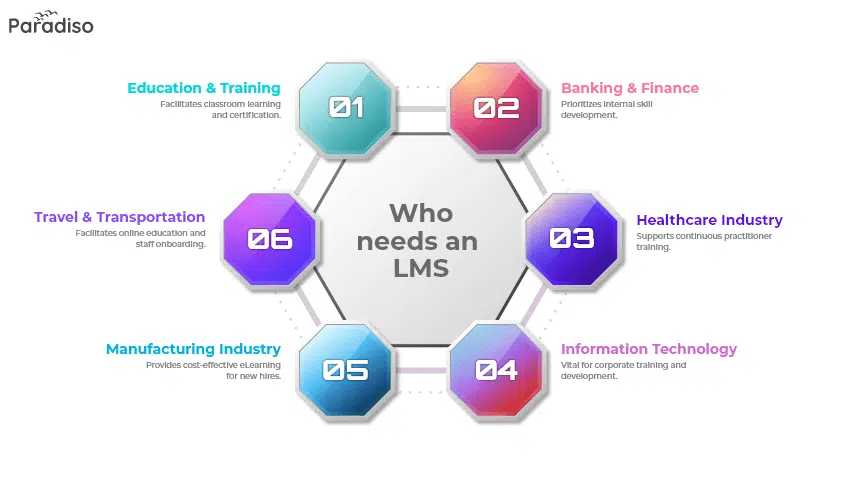
Corporate training programs are vital for employee growth, efficiency, and retention. Without an LMS, it’s difficult to ensure consistent training, track progress, or scale training programs across different departments and regions.
A leading omnichannel beauty and grooming brand in India leveraged Paradiso LMS to streamline its training for sales teams and employees across 100+ retail locations. The result? A 60% improvement in employee onboarding time and 30% increased sales. (source)
Why They Need an LMS:
Education institutions are racing to digitize their training models to keep up with the demand for flexible, interactive, and accessible learning experiences. An LMS ensures that educational content is delivered consistently, effectively, and on time.
A school district in the United States implemented Paradiso LMS paired with Clever SIS to streamline training across hundreds of teachers and administrators. The result was a 40% reduction in administrative hours and improved teacher satisfaction with training programs. (source)
Why They Need an LMS:
Healthcare organizations need high-quality, regulated training to ensure compliance with industry standards, improve patient care, and reduce the risk of errors. An LMS helps automate certification, track learning progress, and centralize medical training.
A global healthcare nonprofit used Paradiso LMS to improve the training efficiency of its medical staff. This resulted in a 60% reduction in training costs and improved knowledge retention among employees, ensuring compliance with updated medical regulations. (source)
Why They Need an LMS:
In the manufacturing sector, training is crucial to ensuring employee safety, productivity, and technological proficiency. An LMS can help track safety training, manage machine operation training, and deliver new content for evolving technology.
A leading manufacturing company in the U.S. used Paradiso LMS to streamline safety training and new machinery operation training across their factory floor. This reduced on-the-job injuries by 35% and increased worker efficiency by 25%. (source)
Why They Need an LMS:
Government agencies must meet strict compliance regulations and ensure their teams are highly skilled to perform critical public services. LMS platforms help centralize training, track progress, and ensure compliance with regulatory requirements.
A government organization deployed Paradiso LMS to manage training for over 5,000 employees across different departments. The LMS helped improve training completion rates by 45% and ensured 100% compliance for mandatory courses. (source)
Why They Need an LMS:
Nonprofits Organization often operate with limited resources but still need to ensure their employees and volunteers are trained in specific programs, policies, and procedures. An LMS helps manage training at scale without a hefty budget.
A global nonprofit organization used Paradiso LMS to deliver training across 3 continents to over 2,000 volunteers. The LMS reduced the time spent on training management by 50% and improved volunteer retention by 25% due to better training outcomes. (source)
Why They Need an LMS:
Across industries like corporate training, healthcare, education, and government, the need for a centralized, scalable, and compliance-driven training solution is undeniable.
LMS technology is no longer a luxury – it’s a strategic tool that every organization needs to optimize learning and drive measurable results. Whether you’re looking to reduce training costs, increase engagement, or ensure compliance, an LMS provides real-world solutions.
1. Employee Onboarding : Used internally to help new hires quickly get up to speed with company policies, procedures, and tools. Read More
2. Compliance Training: Ensures employees complete required training for regulatory compliance, used both internally for staff and externally for industry standards. Read More
3. Skill Development and Upskilling: Helps employees develop new skills or improve existing ones for internal growth and professional development. Read More
4. Product and Service Training: Used to educate employees and customers about products or services, both for internal knowledge and external customer training. Read More
5. Remote and Hybrid Workforce Training : Supports remote and hybrid teams by providing consistent online training for employees no matter where they work. Read More
6. Sales Training: Delivers training for internal sales teams on products, services, and sales strategies to boost performance. Read More
7. Leadership and Management Training: Used to develop internal leadership by offering training on decision-making, conflict resolution, and management techniques. Read More
8. Certification and Credentialing: Tracks employee certifications internally for compliance or professional development, and can also be used to issue certificates for external training. Read More
9. Customer Training: Offers training to external customers, helping them understand products and services better, reducing support queries. Read More
10. External Training for Clients and Partners: Delivers training to external stakeholders like clients, vendors, or business partners to ensure they understand the company’s products, processes, and best practices. Read More
11. Sell Courses Online: Used by businesses or individuals to create, market, and sell online courses. Integrates payment gateways for course purchases and subscription models, providing a revenue stream from educational content. Read More
12. Association Member Training: Associations use LMS to offer training, certifications, and professional development for their members. This helps keep members up-to-date with industry trends and enhances the value of membership. Read More
Training programs can get expensive – think travel costs, instructor fees, venue bookings, and the time spent on manual admin tasks. An LMS helps you cut all that out.
Real-World Example:
A global healthcare nonprofit cut training costs by 60% just by switching to an LMS. No more hiring instructors or paying for travel expenses. (source)
Whether you have 10 employees or 10,000, an LMS scales with you. You don’t need to worry about the limitations of traditional in-person training.
Real-World Example:
A global tech company used an LMS to train employees in 50+ countries, making training programs consistent and scalable without needing to bring everyone to a centralized location. (source)
Employees stay engaged when they feel like they’re learning and growing. An LMS helps you create personalized, interactive training that keeps people motivated.
Real-World Example:
A beauty and grooming brand in India used an LMS to engage and train their retail teams, improving sales by 20% and boosting employee retention by 15%. (source)
If you’re in a highly regulated industry, compliance is a must. An LMS makes it easy to ensure that employees complete mandatory training and certifications on time.
Real-World Example:
A leading financial services company used Paradiso LMS to track employee certifications, ensuring 100% compliance during audits and avoiding legal penalties. (source)
An LMS gives you data that helps you understand how effective your training is. You don’t just rely on gut feelings – you have real data to back up your decisions.
Real-World Example:
A nonprofit organization tracked training outcomes through their LMS and identified a 40% improvement in employee performance; thanks to the data-driven insights they gained from the system. (source)
An LMS doesn’t just help learners – it helps administrators too. It takes the pain out of managing courses, tracking progress, and generating reports.
Automated reporting: No more manually compiling reports. With an LMS, you can pull up detailed training reports with just a click.
Easy content updates: Want to update training material or add a new course? It’s quick and easy to do from the admin panel.
Centralized access: Manage all your learners, courses, and data in one place — no more jumping between systems.
Real-World Example:
A corporate training company saved over 50% of admin time by automating tasks like reporting, progress tracking, and content updates through Paradiso LMS. (source)
An LMS (Learning Management System) isn’t just a place to house training content; it’s a complete solution designed to manage, deliver, track, and optimize learning at scale. Here are the real features that matter:
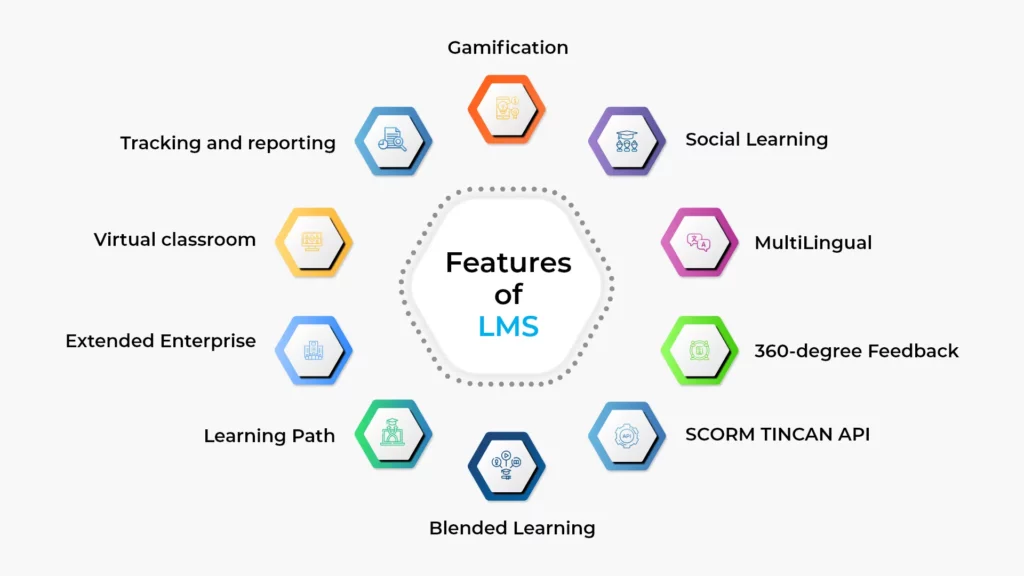
These features make LMS platforms more than just tools – they’re essential for organizations. From creating courses to providing real-time reports, tracking compliance, and integrating with other systems, an LMS is a key part of today’s training landscape.
These capabilities help simplify the learning process, save both time and money, and ensure that training programs are not only effective but also engaging and scalable.
| LMS Name | Key Features | Best For | Pricing Model |
|---|---|---|---|
| Moodle | Open-source, customizable, SCORM support, mobile-friendly | Educational institutions, nonprofits | Free (with paid options) |
| Paradiso LMS | AI-powered, mobile-first, SCORM/xAPI, integrations with HRMS, CRM | Corporate training, Associations training, compliance-focused orgs | Subscription-based |
| TalentLMS | Simple UI, gamification, integrations | Small to medium businesses | Subscription-based |
| Absorb LMS | Mobile learning, reporting tools, learner paths | Enterprise organizations | Subscription-based |
| Docebo | AI-driven learning, social learning, SCORM | Large enterprises | Subscription-based |
| Adobe Captivate | Advanced content creation, VR, responsive design | Course creators | One-time or subscription |
| SAP Litmos | SCORM/xAPI, mobile, reporting, gamification | Enterprise training | Subscription-based |
| Cornerstone OnDemand | Learning + performance + certifications | Large organizations | Subscription-based |
| LearnUpon | Multi-tenancy, integrations, analytics | Global organizations | Subscription-based |
| iSpring Learn | SCORM, mobile-friendly, easy to use | Businesses needing simple solutions | Subscription-based |
AI-Powered Learning
Personalized learning paths, smart content recommendations, AI-driven course creation, and AI roleplay for interactive learning experiences.
Endless Customization
Tailored branding and user interface, flexible course structures, and custom reporting and user roles to ensure a personalized learning environment.
Enterprise-Grade Security
Data encryption for privacy, Single sign-on (SSO) integration, and compliance with industry standards like GDPR, SOC2, and HIPAA compliance to ensure enterprise-level security
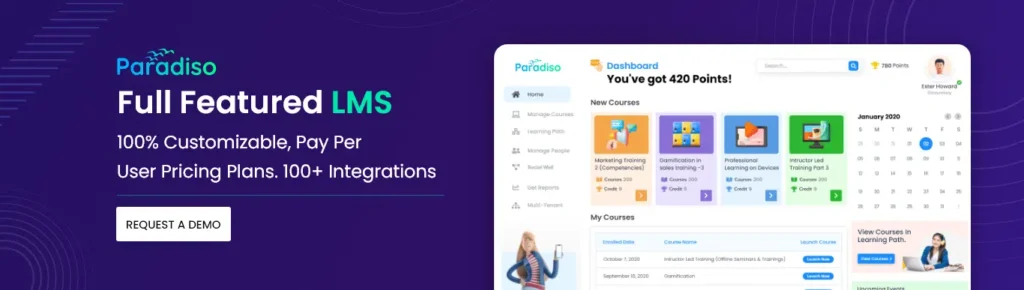
Deploying an LMS and integrating it with your existing systems can have a significant impact on your organization.
However, it requires careful planning to ensure a smooth transition and full adoption. Here’s a step-by-step guide on how to deploy an LMS, the integration options available, and why integration is important for your business.
Deployment is the first step in getting your LMS up and running. You can choose between cloud-based or on-premise deployment, depending on your company’s needs, infrastructure, and security requirements.
Most modern LMS platforms are cloud-based, meaning they are hosted off-site by the provider. This option is more cost-effective, scalable, and easier to implement, as the provider handles all maintenance, updates, and security. Cloud-based solutions are ideal for companies that need flexibility, remote access, and minimal internal IT involvement. Read More
With an on-premise LMS, the system is hosted within your organization’s own servers. This option is typically chosen by larger enterprises that need full control over their data and security protocols. While it requires more upfront investment and internal resources for management, it can be the right choice for organizations with specific data privacy concerns or stringent regulatory needs. Read More
Key Considerations:
Deploying an LMS is not a “set it and forget it” process. You’ll need to follow a series of phases to ensure everything goes smoothly.
Identify the goals of your LMS, user needs, and the key features required. Determine whether your LMS needs integration with HRMS, CRM, or other business tools.
Choose an LMS that fits your needs. Customize it to reflect your brand, adjust user roles, and permissions, and upload initial training content.
Run a pilot program with a small group of users to test the system’s functionality, ease of use, and integration with other systems. Make adjustments based on feedback.
Once the system is tested and adjusted, roll it out to your full workforce. Provide support during the transition period and encourage feedback.
After deployment, continue to monitor the system’s performance, update content, and make improvements based on learner feedback and new business needs.
Timeline:
Once the system is deployed, the next step is setting up training programs, users, and permissions.
Upload training materials, organize them into courses, and create learning paths. Set up assessments and quizzes to measure learner performance.
Add users to the system, either by manual enrollment or bulk imports (e.g., via CSV). Organize them into groups based on departments, teams, or job roles, and assign specific courses or learning paths accordingly.
Define roles and permissions for different users. For example, admins might have full control over the system, while learners only access training content. Customize permissions based on the roles and responsibilities of different users.
Yes, integrating an LMS with your existing software systems is not only possible, it’s essential. Integration allows for seamless workflows, automated processes, and better data sharing between your systems.
In today’s rapidly evolving corporate environment, your Learning Management System (LMS) should work in sync with other tools you rely on to ensure seamless learning experiences.
LMS integrations allow for data flow between systems, automation, and enhanced learner engagement. If your LMS is isolated from other core systems, you’re missing out on the power of connected learning ecosystems.
Here are 10 essential LMS integrations that can supercharge your training programs and ensure maximum efficiency.
Video conferencing tools are crucial for live training, webinars, and virtual classrooms. Integrating these tools with your LMS allows instructors and learners to seamlessly switch between content delivery and real-time discussions. It also helps to track attendance and record training sessions, which can later be stored in your LMS for review.
Why it matters:



Connecting your HR Information System (HRIS) with your LMS ensures that all learner data – from job titles to learning progress – is synced automatically. This integration allows for automated user profiles, making onboarding and training management easier.
Why it matters:



CRM systems like Salesforce and HubSpot track customer interactions, sales opportunities, and lead statuses. Integrating your LMS with these platforms lets you tailor training content based on sales data, client interactions, and customer needs.
Why it matters:

With Single Sign-On (SSO), learners can access their LMS with their existing corporate credentials, eliminating the need for multiple logins. This reduces friction for users, improving engagement and adoption, while also enhancing security by centralizing authentication.
Why it matters:

Slack and Microsoft Teams have become critical for team collaboration, making them excellent platforms for pushing training reminders, engagement notifications, and microlearning content. Integrating your LMS with these tools keeps training top of mind.
Why it matters:

Integrating with third-party content providers like GO1, LinkedIn Learning and Coursera give your learners access to external resources within your LMS. This provides a broader learning library and the ability to curate content for specific development needs.
Why it matters:



For selling courses, integrating with e-commerce platforms like Shopify or WooCommerce can turn the LMS into a full-fledged online training marketplace. These integrations allow providers to manage subscriptions, course bundles, and digital product sales directly within the LMS.
Why it matters:


Training providers who offer paid courses need seamless integration with payment gateways. Integrating your LMS with PayPal, Stripe, or Authorize.net allows you to process payments directly within the LMS, eliminating manual invoicing and creating a frictionless purchase experience for learners.
Why it matters:



For many training providers, issuing certificates is a critical part of their service. EasyCert or Accredible integrations with your LMS allow you to automatically generate certificates once learners complete courses, ensuring timely delivery and eliminating administrative work.
Why it matters:



Training providers often need the ability to create high-quality, interactive content that engages learners. Integrating your LMS with authoring tools like Paradiso Authoring tool, Articulate 360 or Adobe Captivate makes it easier to upload, edit, and manage interactive courses directly within your LMS platform.
Why it matters:



If you have other tools you’re using, most LMS platforms offer API integration that allows you to connect with third-party systems.
These integrations are managed through an application programming interface (API), which serves as a bridge between your software systems and your LMS. APIs enable programmatic data transfer between two systems, sometimes even exchanging similar data.
An LMS can integrate with any third-party system through APIs. To put it simply, with the interface between Twitter and YouTube, you can play a YouTube video directly on Twitter without leaving the platform. APIs are the key to connecting everything together. While Twitter and YouTube are typically separate systems, the API provides a seamless user experience by allowing them to interact.
APIs, with their built-in mechanism, allow real-time data import and export via HTTP and support widely-used web data formats like XML, JSON, Atom, and RSS.
In simple terms, APIs enable two systems to communicate with each other. They support integration with back-end systems such as Human Resource Management Systems and facilitate the integration of learning record stores for detailed Learning and Development analysis. Additionally, APIs provide access via mobile devices, desktop applications, and browser-based technologies like Adobe Flash.
When it comes to LMS pricing, it can get a bit confusing because costs vary widely based on the platform, number of users, features, and deployment options. Understanding how pricing works is key to selecting the right LMS that fits both your budget and your needs.

The Pay Per User model charges a set fee for every registered user (learner/seat), regardless of activity. This pricing model is ideal for organizations offering mandatory or consistent training, where all employees need access to the LMS.

In the Pay Per Active User model, organizations are charged only for users who log in or engage with the platform during a billing cycle. This model is ideal for businesses with variable or seasonal training needs, where not all employees will use the LMS at all times.

The Subscription (Tiered) model involves a flat monthly or annual fee for a set number of users or features. This model is structured in tiers - small, medium, or enterprise - depending on the size of the organization and the features they need. As the organization grows, they can scale to higher tiers with additional users or advanced features.

The Licensing (Perpetual/Annual) model charges a set price for the entire organization, typically offering unlimited users. This cost can be paid either annually or as a one-time high upfront fee. While the upfront cost may be higher, this model often comes with long-term benefits, especially for large organizations.
The Open Source LMS model offers the software for free, but costs are incurred for hosting, implementation, and ongoing maintenance. While the software itself doesn’t have licensing fees, organizations will need to invest in technical support, customization, and infrastructure.
LMS providers typically offer two pricing models: subscription-based and one-time purchase. Here’s how they differ:
Most modern LMS platforms follow the subscription model (monthly or yearly). You pay a recurring fee based on factors like number of users, features, and support levels. This model is popular because it spreads costs over time and ensures you get ongoing updates and support.
Pros:
Cons:
Some LMS providers offer a one-time purchase option, where you pay a lump sum upfront for perpetual access to the platform. This model is often used for on-premise LMS solutions.
Pros:
Cons:
LMS providers usually offer pricing tiers or packages designed to meet the needs of different types of organizations. The tiers usually vary based on the number of users, features, and support options.
Typically for small organizations or businesses just getting started with LMS. Includes basic features like course creation, reporting, and user management, but may lack advanced features like advanced reporting, mobile access, or compliance tracking.
For medium-sized organizations or those needing more robust features. Includes additional features like integrations with other tools (e.g., HRMS, CRM), gamification, and custom branding.
Aimed at large organizations with thousands of users. These packages often include custom integrations, advanced reporting, scalable user management, and premium support. Pricing is often customized based on specific requirements.
Real-World Example: A global tech company opted for an enterprise-tier LMS to handle 5,000 users and integrate it with their HRMS system, which resulted in a significant improvement in training scalability and compliance tracking. (source)
LMS pricing can fluctuate based on several key factors. Here’s a breakdown of what can affect the overall cost:
Real-World Example: A nonprofit organization used Paradiso LMS’s cloud-based subscription model, which allowed them to scale training across 20+ global locations without high upfront costs. (source)
When choosing the right LMS, you need to consider several factors to ensure you get the best value for your investment. Here’s a realistic buyer’s guide to help you make a solid decision.
Choosing the best LMS isn’t just about picking the cheapest option. It’s about investing in a solution that meets your needs, fits your budget, and provides real value to your organization. Take the time to consider your features, pricing, and scalability needs before making a final decision. Remember, a good LMS will provide lasting returns in terms of employee engagement, productivity, and business growth.

In conclusion, adopting an LMS is no longer a luxury for organizations – it’s a necessity for staying competitive, efficient, and compliant. From reducing training costs to improving employee engagement and ensuring regulatory compliance, an LMS centralizes and streamlines your training processes, making it easier to scale, manage, and measure learning.
With features like AI-powered personalization, mobile-first learning, and advanced analytics, the LMS landscape is evolving rapidly, and those who don’t adapt risk falling behind.
Whether you’re in corporate training, education, healthcare, or manufacturing, the ability to integrate with other systems and track meaningful data makes an LMS a strategic investment that directly impacts your bottom line.
At the end of the day, an LMS isn’t just about managing training – it’s about transforming the way your organization learns, grows, and stays compliant.
So, if you haven’t already, it’s time to take the leap into the future of learning with an LMS that fits your needs, budget, and growth trajectory. The right system will not only enhance your learning efforts but will also drive measurable improvements in performance, engagement, and compliance.
Don’t wait – embrace the power of an LMS today and start seeing the results tomorrow.
An LMS can help businesses by:
An LMS typically supports a variety of content types, including:
This flexibility ensures that learning is engaging, versatile, and accessible across formats.
An LMS enhances training efficiency by:
This automation reduces manual work and allows for faster, more efficient employee onboarding and development.
Most LMS platforms ensure data security by utilizing:
These measures ensure that learner and organizational data are well protected.
Yes, an LMS can integrate with other enterprise systems like:
These integrations enable seamless workflows and improve data synchronization across platforms.
Choosing between the two depends on your organization’s size, resources, and data security requirements.
Yes, many LMS platforms, especially AI-powered and customizable systems, allow you to:
Customization ensures that the LMS aligns with your company’s unique training requirements.
Yes, LMS platforms are highly effective for compliance training. They enable:
This makes it easier to ensure your organization meets regulatory requirements across various industries.
The cost of an LMS can vary significantly based on factors like:
Generally, pricing is subscription-based, but some providers offer a one-time licensing fee for on-premise solutions.
Experience the power of a highly customizable, AI-powered LMS. Book a demo today and see how Paradiso LMS can revolutionize your learning programs!

A scalable, AI-powered learning platform with advanced analytics and mobile access—built to drive performance across your organization.
Rapidly create professional, interactive courses with AI-driven course-building tools tailored for business training.

Access a curated library of certified, industry-relevant courses to upskill teams, ensure compliance, and accelerate growth.
A scalable, AI-powered learning platform with advanced analytics and mobile access—built to drive performance across your organization.
Rapidly create professional, interactive courses with AI-driven course-building tools tailored for business training.

Practice real-world scenarios with AI-powered simulations to build skills, improve performance, and prepare every team for confident, high-impact conversations.
Solutions
Industry
Our website uses cookies to ensure it functions properly and provides a safer experience. Some cookies are necessary for the website to operate. By clicking 'Accept,' you agree to the use of cookies as outlined in our Privacy Policy. If you click 'Decline,' only essential cookies will be used.

SCENARIOS
AI FEEDBACK
USERS
Create Courses in Minutes – Free!
No thanks, I’ll try later.

Don’t Leave Without Free L&D Tools!

See Paradiso LMS in Action!
No thanks, I’ll try later.

See The Free LMS In Action?
No thanks, I’ll try later.

Course Catalog
Don't Miss Free eLearning Content!
Access a vast library of professional course with certificates in Paradiso’s Course Catalog – start learning today.